

AVAILABLE NOW


Photo Studio Home 2027
Organize Your Photo Library, Your Way

Discover new and improved features in ACDSee Photo Studio Home 2027 that redefine what’s possible.
ACDSee Photo Studio Home 2027 takes the chaos out of your photo collection and puts the imagination in. Generative AI tools give you entirely new and exciting ways to create, reimagine, and edit images. The addition of Reject Tags to an already robust Digital Asset Management toolkit makes it easy to flag and clear out shots that don’t make the cut. Keeping your library organized, inspired, and ready for what’s next is easy with ACDSee.


GENERATIVE AI
The limit does not exist
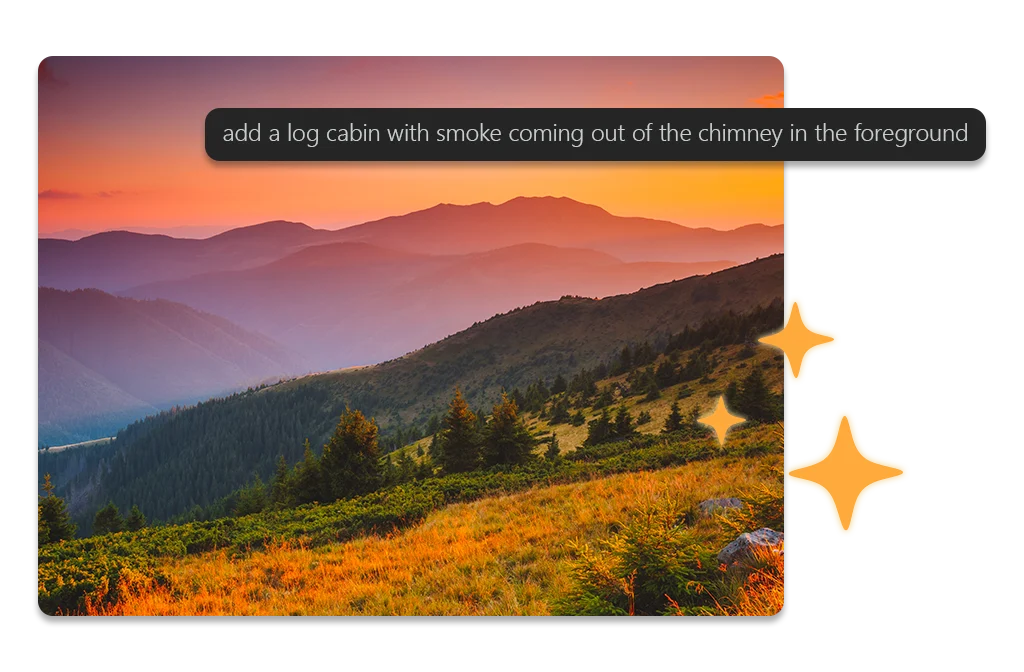
Generative AI tools in ACDSee Photo Studio 2027 create more space for your imagination.






REJECT TAG
Cut the Clutter
Not every frame makes the cut, so stop letting the missed ones slow you down. Mark blinks, blurs, and duds with the new Reject Tag as you review, then pull up your rejects and clear them out in a single pass. Take every shot with confidence knowing ACDSee will keep you sorted.
Digital Asset Management
- ACDSee skips the slow import — it connects directly to your hard drive and gets to work, so your photos are ready to organize the moment you open them.
- As you browse, add ratings, tags, categories, keywords, location data, and customizable color labels to keep a growing collection under control.
- New: Mark blinks, blurs, and duds with the Reject Tag as you review, then pull up your rejects and clear them out in a single pass.
- Find the exact shot you need in seconds with Quick Search and Advanced AND/OR Search, then handle the rest in bulk — resize, rename, convert file formats, and clear out duplicates with batch tools.
- AI Face Detection & Facial Recognition finds the faces in your photos so you can name them once and search by person from then on, building on the names you’ve confirmed to suggest matches you can accept or reject in batches.



Complex Photo Editing Made Easy
- Every detail in your images is under your control, no matter the conditions you faced when shooting.
- New Generative AI tools bring Text-to-Image, Edit, Remove, and Fill directly into your workflow, so you can conjure new images, add details where they belong, and erase distractions with ease.
- Boost colors with powerful tools like Split Tone and Color EQ, refine composition with cropping, flipping, resizing, and rotation, and fix common flaws using Skin Tune, red-eye correction, and clarity adjustments.
- Add personality and polish by removing haze, adding grain, inserting text, borders, vignettes, watermarks, or even drawing on your image.
- Delve into the details with targeted edits and brush on special effects to make photos exactly as desired.
Complex Photo Editing Made Easy
- Every detail in your images is under your control, no matter the conditions you faced when shooting.
- New Generative AI tools bring Text-to-Image, Edit, Remove, and Fill directly into your workflow, so you can conjure new images, add details where they belong, and erase distractions with ease.
- Boost colors with powerful tools like Split Tone and Color EQ, refine composition with cropping, flipping, resizing, and rotation, and fix common flaws using Skin Tune, red-eye correction, and clarity adjustments.
- Add personality and polish by removing haze, adding grain, inserting text, borders, vignettes, watermarks, or even drawing on your image.
- Delve into the details with targeted edits and brush on special effects to make photos exactly as desired.


Photo Studio Home 2027
Why upgrade to Home 2027?
System Requirements
To activate your software, to validate your subscriptions, or to access online services, you will need a valid email address and an internet connection.
Build
Product Documentation
Use the links below or press F1 while performing any function in ACDSee to open the relevant online help page.
Helpful Links
ACDSee AI Credit Packs
ACDSee Video Tutorials
ACDSee Connect
ACDSee Support Center
ACDSee Product Forum
Migrate from Photoshop™ & Lightroom™
RAW File Support
Supported File Formats
ACDSee Plug-ins
ACDSee Product Comparison
ACDSee Competitor Comparison
ACDSee SDK
Contact Customer Support
30-Day Money Back Guarantee
Our 30-Day Guarantee means if you aren’t fully satisfied, just let us know, and you will be fully refunded on any purchased ACD Systems product.